
 +91
63563 43145
How we develop your app
We start with your users and the tasks they need to complete, then define the app flows, integrations and changes required for your project.
Explore our process
Doctor & pharmacy apps
ClinicDesk brings patient bookings, medicine orders and doctor communication alongside hospital, lab and counter views.
From $2,500 for apps in this category, with your name, logo and colours. The exact price depends on the app and the changes you need. See what the price covers
Discuss your branding, the modules you need and how the app connects to your operation.
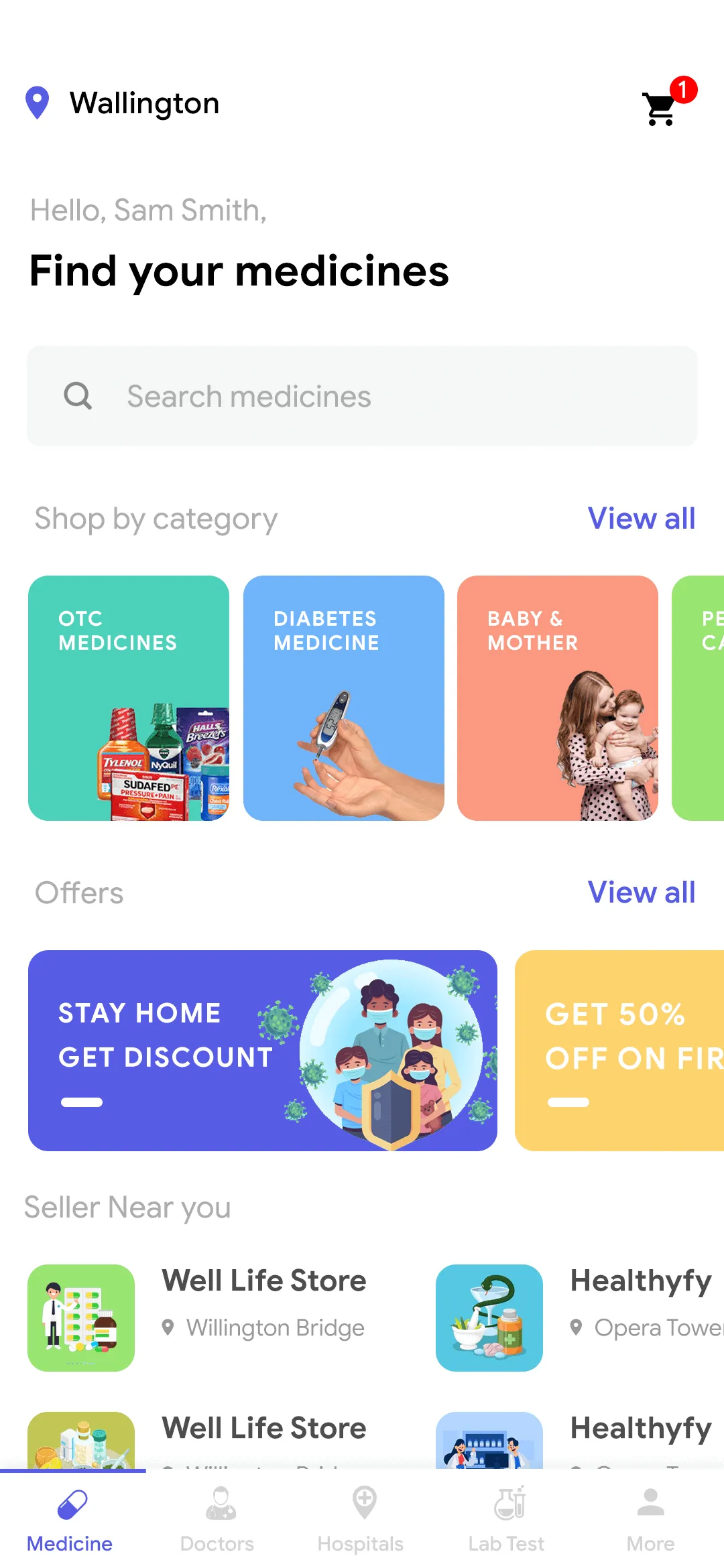
Selected interface references from supplied source material. Some inconsistent sample screens are omitted. The Original interactive demo uses fictional records and does not verify every pictured function. Confirm the current package, included modules and customisation in your walkthrough.
Search for a doctor, hospital or lab and check the relevant profile.
Book the appointment or lab service from the patient view.
Check which care team handles the request and where the counter or lab view comes in.
See which roles and platforms are listed for this product. Confirm what comes with your selected package.
The ClinicDesk user app helps patients find practitioners and hospitals, request appointments and place medicine orders.
The doctor app supports communication with patients and review of their health information.
Pharmacy stores can manage online sales, orders and customer communication.
The delivery app shows pickup locations, delivery addresses and order items. It also supports live tracking for customers and sellers.
The lab app supports requests, status tracking and access to laboratory test results for the relevant providers and patients.
The hospital app supports access to medical records, appointment scheduling and healthcare information within the agreed user roles.
The kiosk view supports self-service ordering within the hospital workflow.
Collect customer feedback using several question types.
The web counter provides a staff interface for the hospital’s ordering and billing workflow.
The web admin panel supports management of users, doctors, sellers and delivery staff. Its dashboard provides charts for reviewing activity.
Request a current proposal before choosing a package. Confirm availability, licence rights, included apps, setup and support for your project. Website screenshots show proposed catalogue branding applied to supplied interfaces. Downloadable demo apps may retain earlier branding; their code has not been rebuilt. Confirm application branding and customization in the agreed project scope.
Scroll sideways to compare all four packages.
| Particulars | Bronze | Silver | Gold | Platinum |
|---|---|---|---|---|
| Source code and documentationComplete source code along with Installation documentation. | Listed | Listed | Listed | Listed |
| Server SetupSetting up the backend on the client’s server. | Not listed | Listed | Listed | Listed |
| Android App InstallationPublishing android apps on the client’s Playstore. | Not listed | Listed | Listed | Listed |
| Google Play creative designCreative design resembling the overview of your application. | Not listed | Not listed | Listed | Listed |
| iOS App InstallationPublishing iOS apps on the client’s App Store. | Not listed | Not listed | ListedUser | ListedAll Apps |
| App Store CreativeCreative design resembling the overview of your application. | Not listed | Not listed | Listed | Listed |
| App Reskin (Color change)Reskin the app with the color of the client's choice. | Not listed | Not listed | Listed | Listed |
| Logo Designing (2 Concepts)Design the logo of the client’s application. | Not listed | Not listed | Listed | Listed |
| Branded stationeryCustom designing the stationery material with your branding. | Not listed | Not listed | Listed | Listed |
| App Resources PersonalisedDesigning custom category images and stuff for the mobile app. | Not listed | Not listed | Not listed | Listed |
| One Additional LanguageIntegrating an additional language of client's choice in the mobile app. | Not listed | Not listed | Not listed | Listed |
| App Landing PageProviding a handsomely designed and detailed web landing page. | Not listed | Not listed | Not listed | Listed |
| App introductory VideoCreate a commercial video of the client's product for advertisement and marketing. | Not listed | Not listed | Not listed | Listed |
| App PresentationMaking a PPT for client's application that can be helpful while pitching the business to prospects. | Not listed | Not listed | Not listed | Listed |
| Marketing brochureDesigning an informative and attractive brochure file for marketing purposes. | Not listed | Not listed | Not listed | Listed |
| Promotional MerchandiseDesign the merchandise with the client's branding like T-shirts and such. | Not listed | Not listed | Not listed | Listed |
| Telephonic UpdatesVoice call with the project manager. | Not listed | Once a week | Twice a week | Daily |
| SupportSupport covers bug fixes and updates. | Not listed | 3 months | 3 months | 1 year |
| Pricing | Request pricing | Request pricing | Request pricing | Request pricing |
Bring one appointment and the work it creates for the desk, clinician and lab. Review which views your staff actually need.
Separate appointment, hospital administration and point-of-sale responsibilities; identify which modules and data flows the selected build actually includes.
Review the current build, included apps and backend with Growmoon. Confirm supported platforms, licence permissions, installation responsibilities and support in the written proposal. Agree integrations and customisation separately.
Walk through a representative task using the listed screens, then identify the changes your users need. Compare those changes and external dependencies with a custom build. Agree code access, deployment responsibilities and maintenance before choosing.
The technologies listed here support the mobile apps, backend and admin tools in this product presentation. Confirm the stack and versions included in your selected package.
We start with your users and the tasks they need to complete, then define the app flows, integrations and changes required for your project.
Explore our processOur app work uses technologies including Flutter, Angular, Laravel and Ionic. The selected product and project requirements determine the platforms, framework versions and integration work.
Read the technology guideTell us which parts of the workflow you need. Ask about current availability, updates or customisation.